Merge My Educator Account


I-LEAD allows users to merge multiple existing educator accounts with the same names on the My Profile Information page through the I am an Educator button. People who work in child care programs use educator accounts. Staff, admins, volunteers and household members need their own educator accounts for consent, background checks and professional development purposes.
Examples of when to use this feature:
- You have two or more accounts that need to be merged.
- You moved from a program and no longer have access to your email login.
- A paper consent form was sent to a consultant prior to the creation of your I-LEAD account.
- You have multiple consent forms that need to be merged into your current I-LEAD account.
The I am An Educator button is located on the I-LEAD Dashboard landing page. It is only visible to users who do not have an active consent form connected to their current I-LEAD account.
Warning: Account mergers CANNOT be reversed once completed. Check to make sure the email address you’re merging with does not belong to someone else. If it does, this could result in tangled consent information and training.
To merge your accounts, follow the instructions below:
- Click the I am an Educator button. (Fig 1)
- Enter your date of birth and the last four digits of your Social Security Number. Click Submit. (Fig 2)
- Verify your details and click My Information is Correct. (Fig 3)
- Once the system locates your information, a “You have been verified as an Educator” message will appear. Fix any name changes in your profile and click Update Profile to finalize the process.
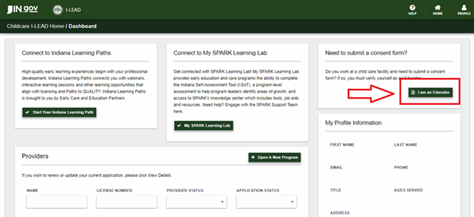
(Fig 1)
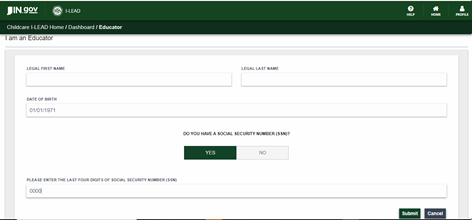
(Fig 2)
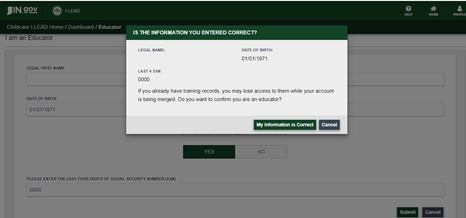
(Fig 3)
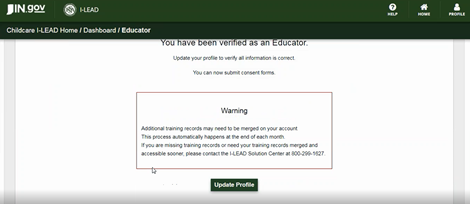
(Fig 4)
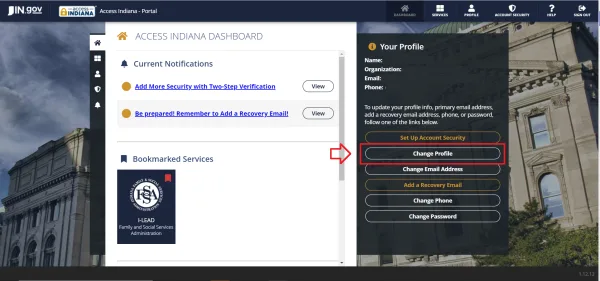
Note: For a successful merger, the spelling of the first and last name must be identical to the spelling on the last consent form submitted. To change your name on the account, make changes to the “First Name” and “Last Name” sections to match your previous account. Missing or extra characters (Ex: Jane Doe-Smith vs Jane Doe Smith) can prevent the accounts from merging. Once you have temporarily changed the name on the account and updated it via “Update Profile,” you can update your information in the next section. You can also go to access.in.gov to change your name and other information in the “Profile” section.
Need Additional Assistance?
If you receive an “Almost Done” error message, have an old I-LEAD account with consent forms but are unable to merge with your records or have additional questions, please contact 1.800.299.1627 for assistance.