
Fingerprinting with IdentoGo

As a part of the background check process, you are required to submit your fingerprints to both state and federal governments. This process is facilitated through the use of IdentoGo fingerprinting service.
Below is their contact information regarding how to schedule an appointment:

On-line Scheduling Option – Available 24/7:
1. Go to identogo.com..
2. Select the State of Indiana and click GO.
3. Select Digital Fingerprinting.
4. Select Schedule a New Appointment.
5. On the Service Code entry screen, use the guide below to enter the correct Service Code for the Fingerprint Reason as instructed by FSSA:
- Juveniles Only (Under age 18): 24Y55F.
- Child Care Center Employee: 24Y7GB.
- Child Care Center Volunteer: 24Y7HV.
- Child Care Home Employee: 24Y7BG.
- Child Care Home Volunteer: 24Y7FY.
- Licensed Exempt CCDF Certified Employees: 24Y7N6.
- Licensed Exempt CCDF Certified Volunteers: 24Y7QQ.
- Unlicensed Registered CC Ministry/Employee: 24Y7SK.
- Once you enter this Fingerprint Reason, enter your OCA Number. This is the first five numbers of your Registered Ministry Number.
- Unlicensed Registered CC Ministry/Volunteer: 24Y7T2.
- Once you enter this Fingerprint Reason, enter your OCA Number. This is the first five numbers of your Registered Ministry Number.
6. Click Continue once the correct code is entered.
7. Agree to all terms to continue the ordering process.
8. Pick an IdentoGo location.
- Search by ZIP code: Enter the ZIP code and click Go.
- Search by Region: Selecting this option will provide a map to click the county.
9. Schedule a date and select a time. The spreadsheet will populate for both. Click the Schedule option for the day you wish to select. There is a "Next Week" option in the upper right-hand corner of the spreadsheet if you need a future date. Once you select a date and click the schedule button, times to select will populate.
10. Complete the demographic information page. Required fields are indicated by a red asterisk (*). When complete, click Send Information. Those scheduling the appointment will fill out their information on the Applicant Name section and enter the information for the person who needs fingerprints on the Applicant Demographic Data section.
11. At the bottom of the page where it says, “Would you like to provide the employer your information?”, select Yes to enter the employer's information or No to move on.
12. Once you have moved to the next screen, a header will say, "Your registration is not yet complete." This is a review screen to verify all your information is correct before filing and paying for the appointment. If everything is accurate, click Go to move onto the payment portion of the screen. Select your method of payment:
- Credit Card.
- ECheck.
- Business Check (pay onsite).
- Money Order (pay onsite).
- Billing Account.
- If payment was already made, select "Yes, I have a referral code to enter" and enter the code.
13. Click Go. Instructions will appear on the screen before you click Continue to finalize your appointment.
14. The last screen will say "Registration Complete" with provider appointment details to print.
15. Print your confirmation page. If you provided the correct email address, you will receive an email confirmation once the appointment is confirmed.
16. Bring the confirmation page/registration ID and payment (if applicable), with one of the following pieces of identification to the appointment:
- Adults:
- Valid Driver’s License
- Valid State Issued Identification Card
- Valid Passport
- Juveniles:
- Student ID with Picture and DOB
- Work ID with Picture and DOB
- Valid Alien ID card with Picture and DOB
- If the juvenile/minor does not have the above identification, the parent and juvenile will both need to present a valid birth certificate and a social security card.
17. Arrive at the IdentoGo Enrollment Center at your appointed date and time. Juveniles must be accompanied by a parent or guardian. The Enrollment Agent at the site will check your valid photo ID, verify your demographic information, capture your fingerprints and submit your data in real time to the Indiana State Police for processing. The Fingerprinting Enrollment Center process normally takes less than five minutes. All results are processed by the Indiana State Police and the FBI before submitting to the Family & Social Services Administration (FSSA) as the Official Requesting Agency. Note: IdentoGo is never in possession of fingerprinting results.
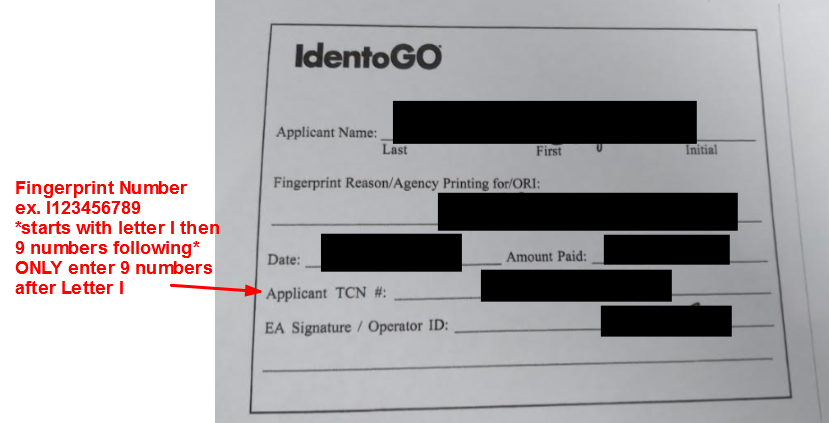
18. Fill out the consent form on I-LEAD using the fingerprint receipt given post-appointment. For new child care programs, only those who completed their licensing applications can invite staff. For new staff members, only those who accepted their educator invitation sent by the provider admin can access their consent form on I-LEAD. Consent forms are due for electronic submission when fingerprints are due. Enter the nine-digit Applicant TCN (minus the ‘i’) on the Inkless Transaction Number section of the consent form (page 2 of 5) for licensing to receive a copy of the fingerprints.
Call Center Scheduling Option
Available Monday-Friday 7 a.m.-6 p.m.:
1. Call 1.877.472.6917 to speak to an operator.
2. Operators will collect the required information and schedule the fingerprinting appointment. Be sure to have complete information for the applicant available when calling, as the operator will ask for the Agency Name, Applicant Type, Registered Ministry Number if applicable and the Applicant’s full name, address, methods of contact and complete personal demographic information.
3. When asked for which agency you are doing fingerprints, answer the Family and Social Services Administration (FSSA).
4. When asked for a Service Code, provide the correct one for your child care program type and select if they are an employee or volunteer. If you do not provide the right code for your child care program type, you may be asked by licensing to redo your fingerprints.
- Juveniles Only (Under age 18): 24Y55F.
- Child Care Center Employee: 24Y7GB.
- Child Care Center Volunteer: 24Y7HV.
- Child Care Home Employee: 24Y7BG.
- Child Care Home Volunteer: 24Y7FY.
- Licensed Exempt CCDF Certified Employees: 24Y7N6.
- Licensed Exempt CCDF Certified Volunteers: 24Y7QQ.
- Unlicensed Registered CC Ministry/Employee: 24Y7SK.
- Once you share this fingerprint reason, you will be asked to provide your OCA Number. This is the first five numbers of your Registered Ministry Number.
- Unlicensed Registered CC Ministry/Volunteer: 24Y7T2.
- Once you share this fingerprint reason, you will be asked to provide your OCA Number. This is the first five numbers of your Registered Ministry Number.
- Unlicensed Registered CC Ministry/Volunteer: 24Y7T2.
5. Provide your ZIP code or city to locate the closest IdentoGo location for your fingerprint appointment.
6. Select a date and time for that location.
7. Provide the demographic information of the applicant who needs the appointment.
8. In the event your fingerprint reason requires you to provide payment for fingerprinting, be prepared to make a payment at the facility or over the phone via card. Acceptable forms of payment include:
- Credit Card.
- ECheck.
- Business Check (pay onsite).
- Money Order (pay onsite).
- Billing Account.
- If payment was already made, provide the referral code over the phone instead.
9. Record your registration ID or check for an email confirmation if they provide one. If you provide an email address with the correct spelling, you will receive a confirmation email. If there is no email, ask for a registration ID from the representative and bring that to the appointment.
10. Bring the confirmation page/registration ID and payment (if applicable), with one of the following pieces of identification to the appointment:
- Adults
- Valid Driver's License
- Valid State Issued Identification Card
- Valid Passport
- Juveniles
- Student ID with Picture and DOB
- Work ID with Picture and DOB
- Valid Alien ID card with Picture and DOB
- If the juvenile/minor does not have the above identification, the parent and juvenile will both need to present a valid birth certificate and a social security card.
11. Arrive at the IdentoGo Enrollment Center at your appointed date and time. Juveniles must be accompanied by a parent or guardian. The Enrollment Agent at the site will check your valid photo ID, verify your demographic information, capture your fingerprints and submit your data in real time to the Indiana State Police for processing. The Fingerprinting Enrollment Center process normally takes less than five minutes. All results are processed by the Indiana State Police and the FBI before submitting to the Family & Social Services Administration (FSSA) as the Official Requesting Agency. Note: IdentoGo is never in possession of fingerprinting results.
12. Fill out the consent form on I-LEAD using the fingerprint receipt given post-appointment. For new child care programs, only those who completed their licensing applications can invite staff. For new staff members, only those who accepted their educator invitation sent by the provider admin can access their consent form on I-LEAD. Consent forms are due for electronic submission when fingerprints are due. Enter the nine-digit Applicant TCN (minus the ‘i’) on the Inkless Transaction Number section of the consent form (page 2 of 5) for licensing to receive a copy of the fingerprints.
Fingerprints processed by IdentoGo do not automatically transfer to the state's background check unit of the Office of Early Childhood and Out-of-School Learning (OECOSL). Completed consent forms on I-LEAD are required so the state's background check unit has authorization to process background checks for potential educators, volunteers, household members and administrators. Complete your consent form as soon as you receive it via Begin Consent Form in I-LEAD.
When the fingerprinting appointment is complete, IdentoGo will provide you with a 4x6 receipt (screenshot below). The educator and admin should submit this fingerprinting receipt to OECOSL at qualification.review@fssa.in.gov for proof of completion and keep a copy on file.
|
Contact IdentoGo directly for assistance if the receipt is lost.
|
Important Notice for Child Care Provider & Staff:
- A consent form is an electronic form available to those who accepted their educator invite that was sent to them by their provider admin or upon completion of a new licensing application
- Anyone on the premises where child care is conducted is required to get fingerprints and do a consent form
- A consent form gives permission from the educator to the state background unit to view the fingerprints and complete the background checks needed to work in child care
- Only educators with a “Qualified” or “Provisional” status and current fingerprints are permitted to work in a child care setting
- Consent forms are provided electronically to a new hire when they accept an educator invite for a license (Note: Multiple invites may be needed before the educator can do their consent form if they work for multiple locations)
- Educators must renew their fingerprints with IdentoGo every (3) years
- Reminder: A consent form can only be done when the fingerprint information is submitted with it
- If an educator or the admin does not follow the above process after renewing their fingerprints, regardless of the current status in I-LEAD, their child care program WILL RECEIVE A VIOLATION from OECOSL licensing.
The fingerprint expiration date is an estimated date based off when the consent form was last submitted. To see the actual fingerprint expiration date, click “View Details” on the Educator’s account to see it listed in the “Educator Details” section. For provider admins, please click “View Details” for your license under “Providers I Administer”, scroll down to the “Associated Educator” roster, and click “View Details” to see the fingerprint expiration date. The date should show within a month of the consent form “Submitted Date”. If its missing, please either have the person redo their consent form or reach out to qualification.review@fssa.in.gov for assistance in submitting the IdentoGO fingerprint receipt.
IdentoGo Billing Issues: Please contact the Billing Department via esd-billing@us.idemia.com if you need to dispute a payment or request a refund. The registration ID will be needed from the confirmation email sent at the time of the appointment. Check spam and junkmail for the email if its not in the inbox. Gmail users should check All Mail and Promotions. For a missing registration ID, you may need to call IdentoGo back and ask for it over the phone prior to emailing the billing department. For those who never received an email but saw the payment pulled on the account, you may need to send a screenshot of the payment to the billing department.
Need Additional Help?
For any additional questions or guidance, please contact the OECOSL Child Care Support Line at 1-800-299-1627 or Qualitysupport@fssa.in.gov for assistance.