Manager Role:
Viewing Staff Certificates


Provider admins have the ability to view and download staff certificates.
Click Start Your Indiana Learning Paths to begin. It should automatically connect. If not, go back and click the button again to see if it will take you past the login page.



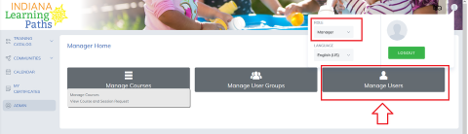
Click on the Profile icon, and change the role from Learner to Manager.

Click the Manage Users button.
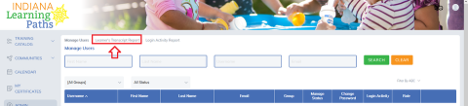
Then click Learner Transcript Reports.
All staff members connected to your license(s) will be in Learner Reports and can be searched by name. Click on the user’s ID number to view which courses that person has completed. Managers can also download the certificate from each completed course for that individual.
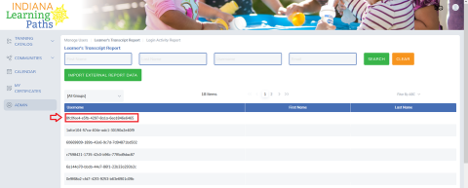
This will show a copy of their transcripts. Managers can download their certificates using the Print Certificate section by clicking the following button:

Note: Please make sure there is a completion date and the certificate hasn't expired. So long as there is a completion date, a pdf file will download. Those with missing completion dates haven't opened all the links in the lesson, met the score requirement or completed the lesson. Check out "Tips to Generate Certificates" for more information. Safe Sleep courses are only required once but have an expiration date in case licensing requires the lesson to be retaken.